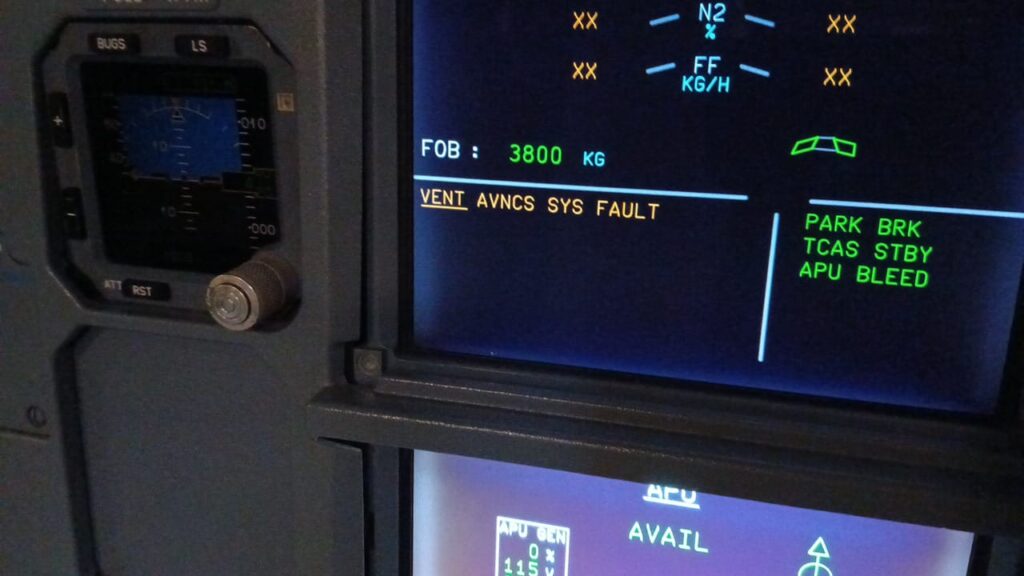
Failure of the Blower Fan A320
1.Possible Causes:
-FAN-BLOWER, AVNCS VENT (20HQ)
-CARTRIDGE-AVNCS VENT FILTER (2082HM)
— (31HQ)
-CNTOR-BLOWER FAN CTL, AVNCS VENT (8HQ)
-C/B-AVNCS VENT/BLOWER/FAN (1HQ)
-AEVC (10HQ)
-C/B-AIR COND/AVNCS/VENT/MONG (3HQ)
-PRESS SW-BLOWER FAN, AVNCS VENT (17HQ)
-PRESS SW-BLOWER FAN, AVNCS VENT (19HQ)
-wiring
2.Job Set-up Information
A. Referenced Information
| REFERENCE | DESIGNATION |
| Ref. 21-26-00-810-803-A | Failure of the Skin Air-Inlet Valve |
| Ref. 24-00-00-810-803-A | Circuit Breaker Tripped and/or C/B TRIPPED Warning |
| Ref. ESPM 20-45-24 | |
| Ref. ESPM 20-46-10 | |
| Ref. ESPM 20-52-11 | |
| Ref. AMM 21-26-00-710-001 | Operational Check of the Avionics Equipment Ventilation-System via MCDU |
| Ref. AMM 21-26-00-710-008 | Operational Test to Read the CFDS for CLASS 3 Faults of the AEVC |
| Ref. AMM 21-26-00-710-009 | Operational Test to Read the CFDS for LAST LEG REPORT of the AEVC |
| Ref. ASM 21-26-03 | |
| Ref. AMM 21-26-11-000-001 | Removal of the Avionics-Ventilation Blower and Extract Fan Pressure-Switches |
| Ref. AMM 21-26-11-400-001 | Installation of the Blower and Extract Fan Pressure-Switches |
| Ref. AMM 21-26-34-000-001 | Removal of the Avionics Equipment Ventilation Computer (AEVC) |
| Ref. AMM 21-26-34-400-001 | Installation of the Avionics Equipment Ventilation Computer (AEVC) |
| Ref. AMM 21-26-35-000-001 | Removal of the Avionics Ventilation Fans Speed Controller |
| Ref. AMM 21-26-35-400-001 | Installation of the Avionics Ventilation Fans Speed Controller |
| Ref. AMM 21-26-43-920-001 | Discard Filter Cartridge (PALL) |
| Ref. AMM 21-26-51-000-001 | Removal of the Extract and Blower Fans |
| Ref. AMM 21-26-51-400-001 | Installation of the Extract and Blower Fans |
3.Fault Confirmation
SUBTASK 21-26-00-865-053-A
A. Table of the circuit breakers used in this procedure:
| PANEL | DESIGNATION | FIN | LOCATION |
| 122VU | AIR COND/AVNCS/VENT/MONG | 3HQ | Y17 |
| 123VU | AVNCS VENT/BLOWER/FAN | 1HQ | AD10 |
SUBTASK 21-26-00-710-090-A
B. Test:
(1) Do the reset of the AEVC (10HQ):
(a) Open the circuit breaker AIR COND/AVNCS/VENT/MONG (3HQ).
(b) Wait for five seconds.
(c) Close the circuit breaker AIR COND/AVNCS/VENT/MONG (3HQ).
(2) Do the operational test of the avionics equipment ventilation from the Multipurpose Control and Display Unit (MCDU) Ref. AMM 21-26-00-710-001
(3) Read the LAST LEG REPORT of the AEVC Ref. AMM 21-26-00-710-009
(4) Read the CLASS 3 faults of the AEVC Ref. AMM 21-26-00-710-008
(5) If the logbook or the Post Flight Report (PFR) gives the ECAM warnings VENT BLOWER FAULT and the VENT SKIN VALVE FAULT:
- Do the troubleshooting procedure of the skin air-inlet valve Ref. TSM TASK 21-26-00-810-803
(6) If the fault continues:
- Go to the Para. Fault Isolation.
4. Fault Isolation
SUBTASK 21-26-00-810-072-D
A. If the test gives the maintenance message BLOWER FAN 20HQ:
NOTE: The blower fan can have different part numbers. The number of indication lights of the blower fan can be different from one part number to the other part number.
(1) Do a visual inspection of the component interfaces and the adjacent area.
(a) Make sure that there is no Foreign Object Damage (FOD):
- On the skin air-inlet valve (15HQ)
- In the ventilation pipe between the skin air-inlet valve (15HQ) and the demister filter (2081HM).
(2) On the blower fan (20HQ), do a check of the status of the warning light:
(a) On the blower fan (20HQ) without the ball-bearing health monitoring:
1 If the RED warning light is on:
- Push the RESET pushbutton switch of the blower fan (20HQ) for a minimum of 2 seconds to reset the fan.
2 If the RED warning light is on and goes off after the reset:
- Go to step (2).
3 If the RED warning light is on and does not go off after the reset:
- Replace FAN-BLOWER, AVNCS VENT (20HQ)Ref. AMM 21-26-51-000-001 and Ref. AMM 21-26-51-400-001
(b) On the blower fan (20HQ) with the ball-bearing health monitoring (part number EVT3454HM01):
1 If the AMBER warning light is on:
- Push the RESET pushbutton switch of the blower fan (20HQ) for a minimum of 2 seconds to reset the fan and go to step (2).
- The AMBER warning light shows that the blower fan is possibly damaged. It is recommended that you continue to monitor the fan and replace it at the next maintenance check Ref. AMM 21-26-51-000-001 and Ref. AMM 21-26-51-400-001
2 If the RED warning light is on:
- Push the RESET pushbutton switch of the blower fan (20HQ) for a minimum of 2 seconds to reset the fan.
a If the RED warning light goes off after the reset:
- Go to step (2).
b If the RED warning light does not go off after the reset:
- Replace FAN-BLOWER, AVNCS VENT (20HQ) Ref. AMM 21-26-51-000-001 and Ref. AMM 21-26-51-400-001
(3) If all the warning lights are off:
- Go to the next step.
(4) Do a check of the status of the avionics ventilation filter:
(a) If the avionics ventilation filters are dirty:
- Replace CARTRIDGE-AVNCS VENT FILTER (2082HM) Ref. AMM 21-26-43-920-001
- Do the test given in Para. 3.
(b) If the avionics ventilation filters are not dirty:
- Go to the next step.
(5) If the fault continues:
- Disconnect connector 20HQ-A from the FAN-BLOWER, AVNCS VENT (20HQ) Ref. ASM 21-26-03
(a) On the connector, on the wiring side, do a check for the ground signal at pin A/H of the FAN-BLOWER, AVNCS VENT (20HQ) :
1 If there is no ground signal:
- Do a check and repair the wiring Ref. ASM 21-26-03
(b) Do a check for 115VAC voltage at pins A/A, A/B, A/C, A/J, A/K and A/L of the FAN-BLOWER, AVNCS VENT (20HQ):
1 If there is no 115VAC voltage:
- Disconnect connector 31HQ-A from the CONT-AVNCS VENT FANS SPD (31HQ).
- Do a check for 115VAC voltage at pins A/A, A/B, A/C, A/J, A/K and A/L of the CONT-AVNCS VENT FANS SPD (31HQ).
a If there is 115VAC voltage:
- Do a check and repair the wiring between the CONT-AVNCS VENT FANS SPD (31HQ) and the blower fan (20HQ) Ref. ASM 21-26-03
b If there is no 115VAC voltage:
- Replace (31HQ)Ref. AMM 21-26-35-000-001 and Ref. AMM 21-26-35-400-001
- Do the test given in Para. 3.
(6) If the fault continues:
- Do a check of the status of the AVNCS VENT/BLOWER/FAN circuit breaker (1HQ) Ref. ASM 21-26-03
(a) If the AVNCS VENT/BLOWER/FAN circuit breaker (1HQ) is open:
- Do the troubleshooting procedure Ref. TSM TASK 24-00-00-810-803
- Do the test given in Para. 3.
1 If the fault continues:
- On panel 107VU, do a visual inspection of connector 1276VC Ref. ESPM 20-52-11
- Do the test given in Para. 3.
2 If the fault continues:
- Replace CNTOR-BLOWER FAN CTL, AVNCS VENT (8HQ) Ref. ESPM 20-45-24
- Do the test given in Para. 3.
3 If the fault continues:
- Replace FAN-BLOWER, AVNCS VENT (20HQ) Ref. AMM 21-26-51-000-001 and Ref. AMM 21-26-51-400-001
- Do the test given in Para. 3.
4 If the fault continues:
- Replace C/B-AVNCS VENT/BLOWER/FAN (1HQ)Ref. ASM 21-26-03 and Ref. ESPM 20-46-10
- Do the test given in Para. 3.
5 If the fault continues:
- Replace AEVC (10HQ) Ref. AMM 21-26-34-000-001 and Ref. AMM 21-26-34-400-001
- Do the test given in Para. 3.
6 If the fault continues:
a Do a check and repair the wiring between:
- The blower fan control-contactor (8HQ), pin L1 and the circuit breaker (1HQ), pin A2
- The blower fan control-contactor (8HQ), pin L2 and the circuit breaker (1HQ), pin B2
- The blower fan control-contactor (8HQ), pin L3 and the circuit breaker (1HQ), pin C2
- The blower fan control-contactor (8HQ), pin T1 and the blower fan (20HQ), pin A/J
- The blower fan control-contactor (8HQ), pin T2 and the blower fan (20HQ), pin A/K
- The blower fan control-contactor (8HQ), pin T3 and the blower fan (20HQ), pin A/LRef. ASM 21-26-03
(b) If the AVNCS VENT/BLOWER/FAN circuit breaker (1HQ) is closed:
1 On panel 107VU, do a visual inspection of connector 1276VC Ref. ESPM 20-52-11
2 Do a check of the status of the AIR COND/AVNCS/VENT/MONG circuit breaker (3HQ):
a If the AIR COND/AVNCS/VENT/MONG circuit breaker (3HQ) is open:
- Do the troubleshooting procedure Ref. TSM TASK 24-00-00-810-803
- Do the test given in Para. 3.
* If the fault continues:
* — Replace C/B-AIR COND/AVNCS/VENT/MONG (3HQ) and Ref. ESPM 20-46-10
b If the AIR COND/AVNCS/VENT/MONG circuit breaker (3HQ) is closed:
- Do a check for 28VDC voltage at pin A/E of the blower fan (20HQ) Ref. ASM 21-26-03:
* If there is no 28VDC voltage:
* — Do a check of the wiring between the blower fan (20HQ), pin A/E and the AIR COND/AVNCS/VENT/MONG circuit breaker (3HQ) Ref. ASM 21-26-03:
** If the wiring is not correct:
** — Repair the related wiring
** If the wiring is correct:
** — Replace C/B-AIR COND/AVNCS/VENT/MONG (3HQ) and Ref. ESPM 20-46-10
* If there is 28VDC voltage:
* — Do a check for 28VDC voltage at pin X of the blower fan control-contactor (8HQ) Ref. ASM 21-26-03
** If there is no 28VDC voltage:
** — Do a check of the wiring between the blower fan (20HQ), pin A/D and the blower fan control-contactor (8HQ), pin X Ref. ASM 21-26-03:
*** If the wiring is not correct:
*** — Repair the related wiring
*** If the wiring is correct:
*** — Replace FAN-BLOWER, AVNCS VENT (20HQ) Ref. AMM 21-26-51-000-001 and Ref. AMM 21-26-51-400-001
** If there is 28VDC voltage:
** — Do a check for ground signal at pin Z of the blower fan control-contactor (8HQ) Ref. ASM 21-26-03
*** If there is a ground signal:
*** — Replace CNTOR-BLOWER FAN CTL, AVNCS VENT (8HQ) Ref. ESPM 20-45-24
*** If there is no ground signal:
*** — Do a check of the wiring between wiring between the blower fan control-contactor (8HQ), pin Z and the AEVC (10HQ), pin AA/8A Ref. ASM 21-26-03:
**** If the wiring is not correct:
**** — Repair the related wiring
**** If the wiring is correct:
**** — Replace AEVC (10HQ) Ref. AMM 21-26-34-000-001 and Ref. AMM 21-26-34-400-001
c Do the test given in Para. 3.
3 If the fault continues:
a Do a check and repair the wiring between:
- The blower fan control-contactor (8HQ), pin L1 and the circuit breaker (1HQ), pin A2
- The blower fan control-contactor (8HQ), pin L2 and the circuit breaker (1HQ), pin B2
- The blower fan control-contactor (8HQ), pin L3 and the circuit breaker (1HQ), pin C2
- The blower fan control-contactor (8HQ), pin T1 and the blower fan (20HQ), pin A/J
- The blower fan control-contactor (8HQ), pin T2 and the blower fan (20HQ), pin A/K
- The blower fan control-contactor (8HQ), pin T3 and the blower fan (20HQ), pin A/LRef. ASM 21-26-03
b Do the test given in Para. 3.
(7) If the fault continues:
- Replace PRESS SW-BLOWER FAN, AVNCS VENT (17HQ) Ref. AMM 21-26-11-000-001 and Ref. AMM 21-26-11-400-001
- Do the test given in Para. 3.
(8) If the fault continues:
- Replace PRESS SW-BLOWER FAN, AVNCS VENT (19HQ) Ref. AMM 21-26-11-000-001 and Ref. AMM 21-26-11-400-001
SUBTASK 21-26-00-710-091-A
B. Do the test given in Para. 3.
5. Close-up
SUBTASK 21-26-00-942-052-A
A. Put the aircraft back to its initial configuration.
(1) Make sure that the work area is clean and clear of tools and other items.