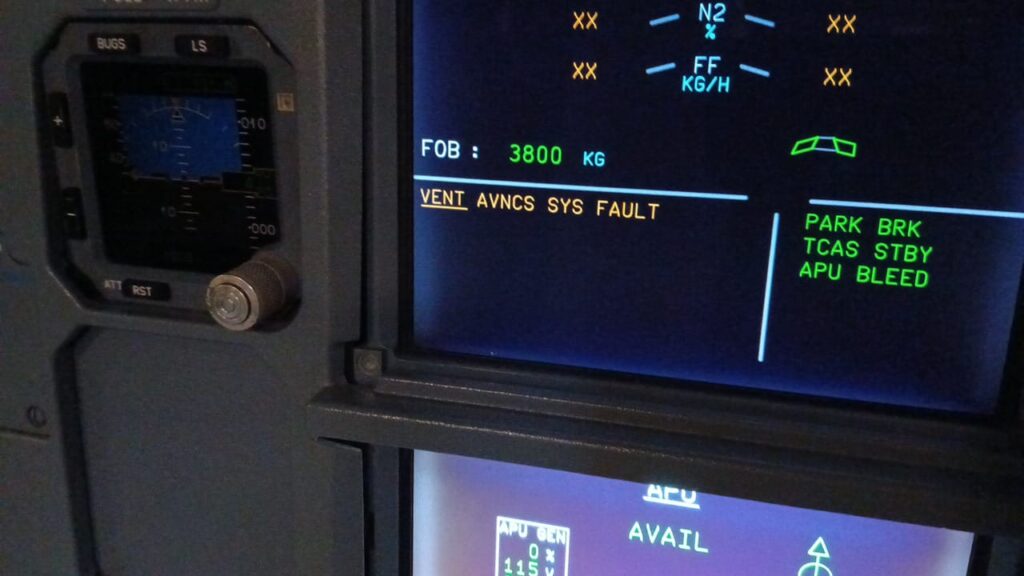
Failure of the Extract Fan A320
1. Possible Causes:
-FAN-EXTRACT, AVNCS VENT (18HQ)
-C/B-AVNCS VENT/EXTC/FAN (2HQ)
-CNTOR-EXTRACT FAN CTL, AVNCS VENT (7HQ)
-AEVC (10HQ)
-C/B-AIR COND/AVNCS VENT/CTL (6HQ)
— (31HQ)
-PRESS SW-EXTRACT FAN, AVNCS VENT (30HQ)
-wiring
-wiring between 31-HQ— (CONT-AVNCS VENT FANS SPD) 31HQ and 18-HQ— (FAN-EXTRACT, AVNCS VENT) 18HQ
2. Job Set-up Information
A. Referenced Information
| REFERENCE | DESIGNATION |
| Ref. 21-26-00-810-804-A | Failure of the Skin Air-Outlet Valve |
| Ref. 24-00-00-810-803-A | Circuit Breaker Tripped and/or C/B TRIPPED Warning |
| Ref. ESPM 20-45-24 | |
| Ref. ESPM 20-45-24 | |
| Ref. ESPM 20-52-11 | |
| Ref. AMM 21-26-00-710-001 | Operational Check of the Avionics Equipment Ventilation-System via MCDU |
| Ref. AMM 21-26-00-710-008 | Operational Test to Read the CFDS for CLASS 3 Faults of the AEVC |
| Ref. AMM 21-26-00-710-009 | Operational Test to Read the CFDS for LAST LEG REPORT of the AEVC |
| Ref. ASM 21-26-02 | |
| Ref. AMM 21-26-11-000-001 | Removal of the Avionics-Ventilation Blower and Extract Fan Pressure-Switches |
| Ref. AMM 21-26-11-400-001 | Installation of the Blower and Extract Fan Pressure-Switches |
| Ref. AMM 21-26-34-000-001 | Removal of the Avionics Equipment Ventilation Computer (AEVC) |
| Ref. AMM 21-26-34-400-001 | Installation of the Avionics Equipment Ventilation Computer (AEVC) |
| Ref. AMM 21-26-35-000-001 | Removal of the Avionics Ventilation Fans Speed Controller |
| Ref. AMM 21-26-35-400-001 | Installation of the Avionics Ventilation Fans Speed Controller |
| Ref. AMM 21-26-51-000-001 | Removal of the Extract and Blower Fans |
| Ref. AMM 21-26-51-400-001 | Installation of the Extract and Blower Fans |
3.Fault Confirmation
SUBTASK 21-26-00-865-054-A
A. Table of the circuit breakers used in this procedure:
| PANEL | DESIGNATION | FIN | LOCATION |
| 49VU | AIR COND/AVNCS VENT/CTL | 6HQ | D06 |
| 122VU | AIR COND/AVNCS/VENT/MONG | 3HQ | Y17 |
| 123VU | AVNCS VENT/EXTC/FAN | 2HQ | AE02 |
SUBTASK 21-26-00-710-092-B
B. Test:
(a) Open the circuit breaker AIR COND/AVNCS/VENT/MONG (3HQ).
(b) Wait for five seconds.
(c) Close the circuit breaker AIR COND/AVNCS/VENT/MONG (3HQ).
- (2) Do the operational test of the avionics equipment ventilation from the Multipurpose Control and Display Unit (MCDU) Ref. AMM 21-26-00-710-001
- (3) Read the LAST LEG REPORT Ref. AMM 21-26-00-710-009
- (4) Read the CLASS 3 faults of the AEVC Ref. AMM 21-26-00-710-008
- (5) If the logbook or the Post Flight Report (PFR) gives the ECAM warnings VENT EXTRACT FAULT and the VENT SKIN VALVE FAULT:
- -Do the troubleshooting procedure of the skin air-outlet valve Ref. TSM TASK 21-26-00-810-804
- (6) If the fault continues:
- Go to the Para. Fault Isolation.
4. Fault Isolation
SUBTASK 21-26-00-810-073-A
A. If the test gives the maintenance message EXTRACT FAN 18HQ
NOTE: The extract fan can have different part numbers. The number of indication lights of the extract fan can be different from one part number to other part number.
- (1) On the extract fan (18HQ), do a check of the status of the warning light:
- (a) On the FAN-EXTRACT, AVNCS VENT (18HQ) not fitted with Ball Bearing Health Monitoring :
- 1 If the RED light was on, push the RESET pushbutton switch of the FAN-EXTRACT, AVNCS VENT (18HQ) for a minimum of 2 seconds.
- 2 If the RED light was on and went off after the reset, go to step (2).
- 3 If the RED light was on and did not go off after the reset, replace theFAN-EXTRACT, AVNCS VENT (18HQ) Ref. AMM 21-26-51-000-001 and Ref. AMM 21-26-51-400-001
- (b) On the FAN-EXTRACT, AVNCS VENT (18HQ) fitted with Ball Bearing Health Monitoring (P/N EVT3454HM01):
- 1 If the AMBER light was on, push the RESET pushbutton switch of the FAN-EXTRACT, AVNCS VENT (18HQ) for a minimum of 2 seconds and go to step (2).
- (a) On the FAN-EXTRACT, AVNCS VENT (18HQ) not fitted with Ball Bearing Health Monitoring :
NOTE: The AMBER light can be an indication that the FAN-EXTRACT, AVNCS VENT (18HQ) is degraded. It is recommended to continue to monitor the fan and replace it Ref. AMM 21-26-51-000-001 and Ref. AMM 21-26-51-400-001 at the next maintenance opportunity.
- 2 If the RED light was on, push the RESET pushbutton switch of the FAN-EXTRACT, AVNCS VENT (18HQ) for a minimum of 2 seconds :
— If the RED light went off after the reset, go to step (2).
— If the RED light did not go off after the reset, replace the FAN-EXTRACT, AVNCS VENT (18HQ) Ref. AMM 21-26-51-000-001 and Ref. AMM 21-26-51-400-001
- (2) If all warning lights are off:
- (a) Do a check of the status of the C/B-AVNCS VENT/EXTC/FAN (2HQ).
- (b) Go to the next step.
- (3) If the C/B-AVNCS VENT/EXTC/FAN (2HQ) is open :
— Do the procedure Ref. TSM TASK 24-00-00-810-803
- (a) If the fault continues:
- — On panel 107VU, do a visual inspection of connector 1278VC Ref. ESPM 20-52-11
- (b) If the fault continues :
- — Replace the CNTOR-EXTRACT FAN CTL, AVNCS VENT (7HQ) Ref. ESPM 20-45-24
- (c) If the fault continues :
- — Replace the FAN-EXTRACT, AVNCS VENT (18HQ) Ref. AMM 21-26-51-000-001 and Ref. AMM 21-26-51-400-001
- (d) If the fault continues :
- — Replace the C/B-AVNCS VENT/EXTC/FAN (2HQ).
- (e) If the fault continues :
- — Replace the AEVC (10HQ) Ref. AMM 21-26-34-000-001 and Ref. AMM 21-26-34-400-001
- (4) If the AVNCS VENT/EXTC/FAN circuit breaker (2HQ) is closed:
- -On panel 107VU, do a visual inspection of connector 1278VC Ref. ESPM 20-52-11
- -Do a check for 115VAC at pins A/J, A/K, A/L of the extract fan (18HQ).
- (a) If there is no 115VAC:
- — Do a check for 115VAC at pins T1, T2, T3 of the extract-fan control contactor (7HQ).
- 1 If there is no 115VAC:
- Do a check of the wiring Ref. ASM 21-26-02 between the extract-fan control contactor (7HQ) pins L1, L2, L3 and the AVNCS VENT/EXTC/FAN circuit breaker (2HQ) pins A2, B2, C2.
- a If the wiring is not correct:
- Repair the related wiring.
- b If the wiring is correct:
- — Replace C/B-AVNCS VENT/EXTC/FAN (2HQ).
- 2 If there is 115VAC:
- — Do a check of the status of the AIR COND/AVNCS VENT/CTL circuit breaker (6HQ).
- a If the AIR COND/AVNCS VENT/CTL circuit breaker (6HQ) is closed:
- — Do a check for 28VDC at pin A/E of the extract fan (18HQ).
- a If the AIR COND/AVNCS VENT/CTL circuit breaker (6HQ) is closed:
- — Do a check of the status of the AIR COND/AVNCS VENT/CTL circuit breaker (6HQ).
* If there is no 28VDC:
* — Do a check of the wiring Ref. ASM 21-26-02 between:
* . The extract fan (18HQ) pin A/E and the AIR COND/AVNCS VENT/CTL circuit breaker (6HQ)
* . The extract fan (18HQ) pin A/F and the ground.
** If the wiring is not correct:
** — Repair the related wiring.
** If the wiring is correct:
** — Replace C/B-AIR COND/AVNCS VENT/CTL (6HQ).
* If there is 28VDC:
* — Make sure that the warning light of the extract fan (18HQ) is off.
** If the warning light is on, push the RESET pushbutton switch on the extract fan (18HQ).
NOTE:
The fan starts immediately.
The warning light goes off.
** If the fault continues:
** — Replace FAN-EXTRACT, AVNCS VENT (18HQ) Ref. AMM 21-26-51-000-001 and Ref. AMM 21-26-51-400-001
** If the fault continues:
** — Do a check for 28VDC at pin AA/9A of the AEVC (10HQ) Ref. ASM 21-26-02
*** If there is 28VDC:
*** — Replace AEVC (10HQ) Ref. AMM 21-26-34-000-001 and Ref. AMM 21-26-34-400-001
*** If there is no 28VDC:
*** — Do a check of the wiring Ref. ASM 21-26-02 between:
*** . The AEVC (10HQ), pin AA/9A and the extract-fan control contactor (7HQ), pin Z
*** . The extract-fan control contactor (7HQ), pin X and the extract fan (18HQ), pin A/D.
**** If the wiring is not correct:
**** — Repair the related wiring.
**** If the wiring is correct:
**** — Replace CNTOR-EXTRACT FAN CTL, AVNCS VENT (7HQ) Ref. ESPM 20-45-24
**** If the fault continues:
**** — Replace FAN-EXTRACT, AVNCS VENT (18HQ) Ref. AMM 21-26-51-000-001 and Ref. AMM 21-26-51-400-001
- b If the AIR COND/AVNCS VENT/CTL circuit breaker (6HQ) is open:
— Do the procedure Ref. TSM TASK 24-00-00-810-803
* If the fault continues:
* — Replace C/B-AIR COND/AVNCS VENT/CTL (6HQ).
- (b) If there is 115VAC:
— Replace FAN-EXTRACT, AVNCS VENT (18HQ) Ref. AMM 21-26-51-000-001 and Ref. AMM 21-26-51-400-001
- (5) If the fault continues:
— Disconnect connector 18HQ-A from FAN-EXTRACT, AVNCS VENT (18HQ):
(a) On the connector, on the wiring side, do a check for ground signal at pin A/H of
FAN-EXTRACT, AVNCS VENT (18HQ):
1 If there is no ground signal:
— Repair the wiring Ref. ASM 21-26-02
(b) Do a check for 115VAC voltage at pins A/A, A/B, A/C, A/J, A/K and A/L of FAN-EXTRACT, AVNCS VENT (18HQ) :
1 If there is no 115VAC voltage:
— Disconnect connector 31HQ-A from CONT-AVNCS VENT FANS SPD (31HQ).
— Do a check for 115VAC voltage at pins A/A, A/B, A/C, A/J, A/K and A/L of (31HQ)
a If there is 115VAC voltage:
— Do a check and repair the wiring between 31-HQ— (CONT-AVNCS VENT FANS SPD) 31HQ and 18-HQ— (FAN-EXTRACT, AVNCS VENT) 18HQ Ref. ASM 21-26-02
b If there is no 115VAC voltage:
— Replace (31HQ) Ref. AMM 21-26-35-000-001 and Ref. AMM 21-26-35-400-001
(6) If the fault continues:
— Replace PRESS SW-EXTRACT FAN, AVNCS VENT (30HQ) Ref. AMM 21-26-11-000-001 and Ref. AMM 21-26-11-400-001
SUBTASK 21-26-00-710-093-A
B. Do the test given in Para. 3.
5. Close-up
SUBTASK 21-26-00-942-053-A
A. Put the aircraft back to its initial configuration.
(1) Make sure that the work area is clean and clear of tools and other items.