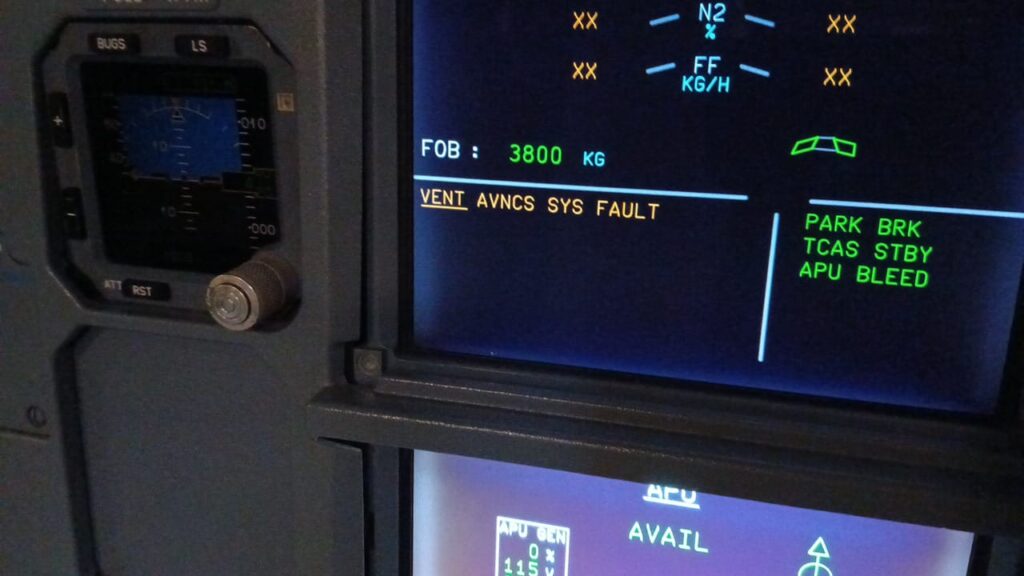
Failure of the Skin Air Valve A320
1. Possible Causes:
- -AEVC (10HQ)
- -VALVE-SKIN AIR OUTLET, AVNCS VENT (22HQ)
- -VALVE-SKIN AIR INLET, AVNCS VENT (15HQ)
- -wiring
2. Job Set-up Information
A. Referenced Information
| REFERENCE | DESIGNATION |
| Ref. AMM 21-26-00-710-001 | Operational Check of the Avionics Equipment Ventilation-System via MCDU |
| Ref. AMM 21-26-00-710-008 | Operational Test to Read the CFDS for CLASS 3 Faults of the AEVC |
| Ref. AMM 21-26-00-710-009 | Operational Test to Read the CFDS for LAST LEG REPORT of the AEVC |
| Ref. ASM 21-26-02 | |
| Ref. ASM 21-26-03 | |
| Ref. AMM 21-26-34-000-001 | Removal of the Avionics Equipment Ventilation Computer (AEVC) |
| Ref. AMM 21-26-34-400-001 | Installation of the Avionics Equipment Ventilation Computer (AEVC) |
| Ref. AMM 21-26-52-000-001 | Removal of the Avionics-Ventilation Skin Air-Inlet-Valve |
| Ref. AMM 21-26-52-400-001 | Installation of the Avionics-Ventilation Skin Air-Inlet-Valve |
| Ref. AMM 21-26-53-000-002 | Removal of the Skin Air Outlet-Valve |
| Ref. AMM 21-26-53-400-001 | Installation of the Skin Air Outlet-Valve |
3. Fault Confirmation
SUBTASK 21-26-00-865-068-A
A. Table of the circuit breakers used in this procedure:
| PANEL | DESIGNATION | FIN | LOCATION |
| 122VU | AIR COND/AVNCS/VENT/MONG | 3HQ | Y17 |
SUBTASK 21-26-00-710-100-A
B. Test
(a) Open the circuit breaker AIR COND/AVNCS/VENT/MONG (3HQ).
(b) Wait for five seconds.
(c) Close the circuit breaker AIR COND/AVNCS/VENT/MONG (3HQ).
- (2) Do the operational test of the avionics equipment ventilation from the Multipurpose Control and Display Unit (MCDU) Ref. AMM 21-26-00-710-001
- (3) Read the LAST LEG REPORT of the AEVC Ref. AMM 21-26-00-710-009
- (4) Read the CLASS 3 faults of the AEVC Ref. AMM 21-26-00-710-008
4. Fault Isolation
SUBTASK 21-26-00-810-083-A
A. Possible maintenance messages (one or more of the following messages):
SKIN AIR INLET V 15HQ
SKIN AIR OUTLET V 22HQ
- (1) If the test gives the maintenance messages SKIN AIR INLET V 15HQ and SKIN AIR OUTLET V 22HQ:
- Replace the AEVC (10HQ) Ref. AMM 21-26-34-000-001 and Ref. AMM 21-26-34-400-001
(a) If the fault continues:
- Replace the VALVE-SKIN AIR OUTLET, AVNCS VENT (22HQ) Ref. AMM 21-26-53-000-002 and Ref. AMM 21-26-53-400-001
(b) If the fault continues:
- Replace the VALVE-SKIN AIR INLET, AVNCS VENT (15HQ) Ref. AMM 21-26-52-000-001 and Ref. AMM 21-26-52-400-001
(c) If the fault continues:
- Do a check and repair the wiring between the AEVC (10HQ) and the skin air-inlet valve (15HQ) Ref. ASM 21-26-03:
. Pin AA/4B and pin A/C
. Pin AA/4A and pin A/A
. Pin AB/4B and pin A/M
. Pin AB/4A and pin A/J.
- 1 If the fault continues:
- Do a check and repair the wiring between the AEVC (10HQ) and the skin air-outlet valve (22HQ) Ref. ASM 21-26-02:
. Pin AA/3A and pin A/A
. Pin AA/3B and pin A/C
. Pin AA/3C and pin A/E
. Pin AB/3A and pin A/J
. Pin AB/3B and pin A/M
. Pin AB/3C and pin A/R.
- (2) If the test gives the maintenance message SKIN AIR INLET V 15HQ:
- Replace the VALVE-SKIN AIR INLET, AVNCS VENT (15HQ ) Ref. AMM 21-26-52-000-001 and Ref. AMM 21-26-52-400-001
- (a) If the fault continues:
- Replace the AEVC (10HQ) Ref. AMM 21-26-34-000-001and Ref. AMM 21-26-34-400-001
- (b) If the fault continues:
- Do a check and repair the wiring between the AEVC (10HQ) and the skin air-inlet valve (15HQ) Ref. ASM 21-26-03:
. Pin AA/4B and pin A/C
. Pin AA/4A and pin A/A
. Pin AB/4B and pin A/M
. Pin AB/4A and pin A/J.
- (3) If the test gives the maintenance message SKIN AIR OUTLET V 22HQ:
- Replace the VALVE-SKIN AIR OUTLET, AVNCS VENT (22HQ) Ref. AMM 21-26-53-000-002 and Ref. AMM 21-26-53-400-001
- (a) If the fault continues:
- Replace the AEVC (10HQ) Ref. AMM 21-26-34-000-001 and Ref. AMM 21-26-34-400-001
- (b) If the fault continues:
- Do a check and repair the wiring between the AEVC (10HQ) and the skin air-outlet valve (22HQ) Ref. ASM 21-26-02:
. Pin AA/3A and pin A/A
. Pin AA/3B and pin A/C
. Pin AA/3C and pin A/E
. Pin AB/3A and pin A/J
. Pin AB/3B and pin A/M
. Pin AB/3C and pin A/R.
SUBTASK 21-26-00-710-101-A
B. Do the operational test given in Para. 3.